Steal Or Die Hiding and Entity Guide
Understand the documented sound and hiding options in Steal Or Die, with a practical threat checklist and clear limits on unverified entity rules.
The developer names closets, vents and barricaded doors as hiding options and says the threat hears footsteps and voice. Use those facts to plan an escape and reduce unnecessary exposure; do not treat a hiding spot as guaranteed protection.
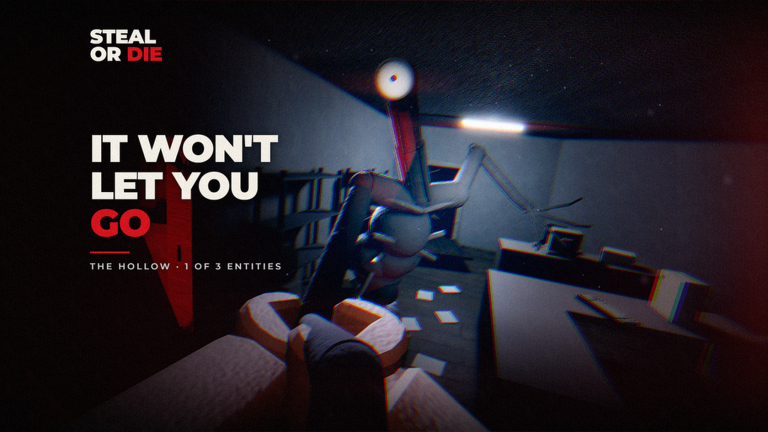
View reference image
On this page
What the developer actually confirms
The official description gives two useful pieces of information: the threat can hear footsteps and voice, and hiding options include closets, vents and barricaded doors. These support planning around exposure. They do not reveal a complete perception model, detection distance, cooldown or guaranteed counter for each entity.
The listing names The Locust and The Hollow among four entities. It does not fully explain every entity’s rules. This page therefore avoids turning an appearance, nickname or one creator encounter into a universal weakness.
Map cover onto a known route
Before collecting far from a familiar area, identify where you could change the plan if the threat appears. Notice a recognizable turn, the route back and a nearby hiding option. You are building a sequence of decisions, not choosing one spot that supposedly solves every encounter.
An option you can see but cannot reliably reach may not help. Consider your current movement after collecting loot. The loot and movement guide covers why a pickup can change the practicality of the same escape route.
Treat sound as a decision
Because footsteps and voice are explicitly mentioned, avoid assuming that a closed visual path makes you undetectable. Consider whether moving or talking adds exposure at the wrong moment. The effect depends on the current encounter; this guide does not claim a specific microphone setting grants invisibility or changes the game’s rules.
Use the on-screen instructions for the controls and interactions available on your device. The developer advertises PC, console, mobile, tablet and VR support, but does not publish a single identical input layout for all of them. A keyboard instruction copied from another player is not necessarily a touch or VR instruction.
Reassess after reaching cover
Taking cover creates another decision point. Look for what has actually changed: the threat’s position, the round clock and your next route. Avoid leaving simply because an arbitrary number of seconds has passed. No exact safe-wait duration is supported by the official description.
A player may be controlling the monster. Repeating a route that an opponent already saw can be predictable even when it worked earlier. That is a reason to observe and adapt, not proof of a hidden tracking ability. Keep explanations tied to what the encounter showed.
Handle an unfamiliar event conservatively
Full Blackout, Bloodbath and Malfunction are named in the listing. Their names alone do not establish their detailed effects. Read the current warning and identify the immediate change before accepting another detour. An unsupported event rule can be more dangerous than acknowledging that you need to observe the match.
After a failed run, ask whether the problem was reaching cover, assuming cover was safe, or leaving without a plan. Those are different failures and need different changes. You have a useful result when you can explain the choice that exposed you and test one alternative on the next beginner run.
Step-by-step guide
- Identify an option before danger
Notice the hiding options along a route you already understand, instead of searching for them for the first time during a chase.
- Read the actual encounter
Watch the threat and your current surroundings before committing to cover; a player-controlled monster can react to your choices.
- Plan the next movement
After taking cover, reconsider your route and the clock before moving toward more loot.
Quick reference
Decision reference
| Documented feature | Useful question | Limit |
|---|---|---|
| Footsteps and voice can be heard | Am I creating avoidable exposure here? | No detection radius or volume threshold is published in this guide |
| Closets and vents are hiding options | Can I identify an option on my route? | No universal immunity claim |
| Barricaded doors are listed | What does the current interaction require? | No invented price or preparation requirement |
| Player monster role exists | Did the opponent observe my route? | Do not assume a fixed AI pattern |
Video evidence
Watch creator walkthroughs alongside this guide. Check the recording date before following requirements that may have changed.
How to Play Steal or Die Roblox Full Guide
Dated footage of the named game for interface and presentation context. Mechanics in this guide follow the current official listing, not creator rankings.
FAQ
Which version does this page cover?
Official listing v1.45, checked 19 October 2026. Check the current game interface when an older guide or clip disagrees.
Is this an official or tested walkthrough?
This is an independent source-based guide. Developer facts and editorial planning suggestions are separated; no hands-on testing, guaranteed route or unsupported numerical values are claimed.
Sources
Recheck these links whenever the game version, release status, or strategy changes.
- Official Steal Or Die game listing Primary source checked 19 October 2026; mechanics are version-specific.